
What does the arrow mean on Instagram? This tiny paper airplane icon has become one of the most powerful features on the platform.
The arrow symbol appears throughout Instagram—on posts, stories, reels, and direct messages.
It represents the share function that lets you send content to friends, reshare posts to your story, or forward messages instantly.
Understanding this feature unlocks better engagement, helps you connect with followers, and maximizes your Instagram experience in 2026.
Table of Contents
Understanding the Instagram Arrow Icon
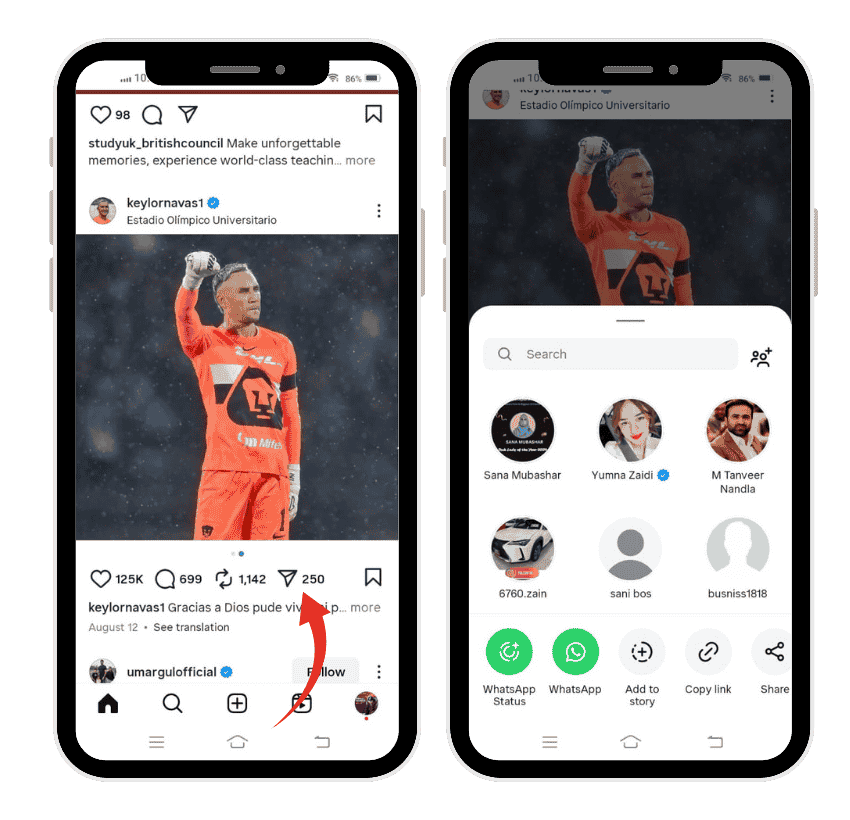
The arrow icon looks like a paper airplane positioned at an angle. Instagram designed it this way to symbolize sending or sharing content.
You’ll find this icon in multiple locations across the app. It appears below every post in your feed, next to the comment and like buttons. The arrow also shows up in Instagram stories when you’re viewing someone’s update.
In direct messages, the arrow serves a forwarding function. It helps you share content quickly without extra steps like downloading or copying.
The primary purpose remains consistent: sharing content with others. Whether you’re sending a post to one friend or broadcasting it to your story, the arrow makes it happen.
Where You’ll Find the Arrow on Instagram
On Feed Posts
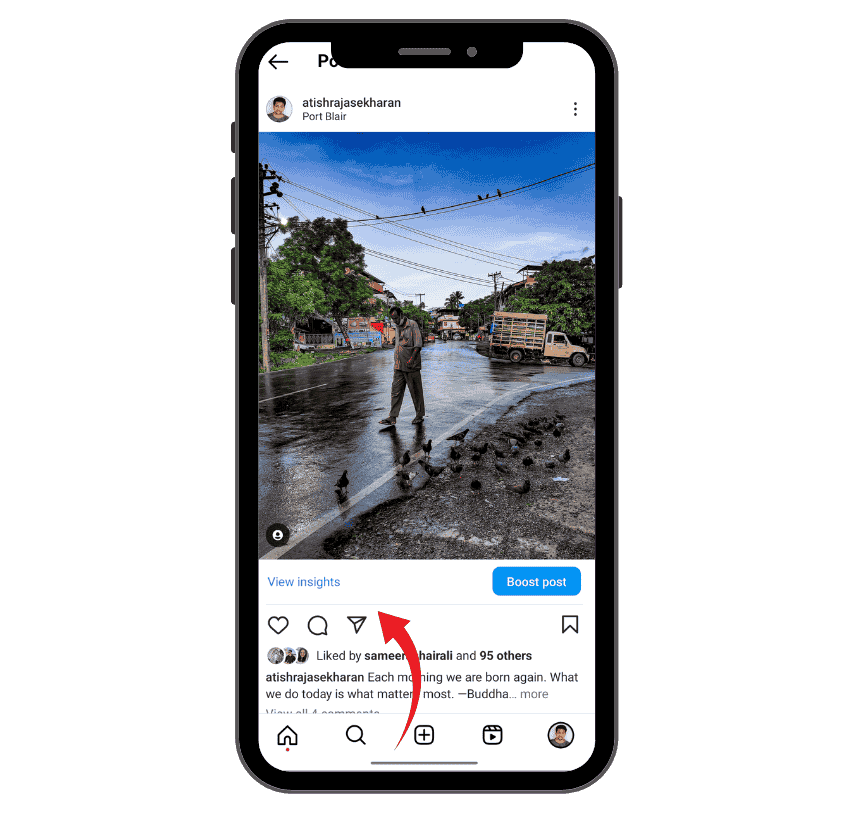
Below every photo, video, or carousel post, you’ll see three main icons. The heart for likes, the speech bubble for comments, and the arrow for sharing.
Tap the arrow to open sharing options. A menu appears with your recent contacts, story sharing option, and external app choices.
In Instagram Stories
When viewing someone’s story, look at the bottom right corner. The arrow icon sits there waiting for your interaction.
Tapping it reveals options to send the story to friends, reply with a message, or share it to your own story (if the creator allows it).
Direct Message Interface
Inside your DMs, the arrow appears next to individual messages. This forward button lets you quickly share that message with another contact.
Whether it’s a text, photo, video, or link, the arrow makes forwarding seamless. No need to copy and paste or save and re-upload.
On Reels
Reels also feature the arrow icon positioned alongside other engagement buttons. The sharing mechanism works identically to regular posts.
What Happens When You Tap the Arrow
Sharing to Direct Messages
The most common use involves sending posts directly to friends. When you tap the arrow, Instagram displays your recent conversations first.
You can select one person, multiple people, or even group chats. Type a friend’s username in the search bar if they don’t appear in recent contacts.
The post gets delivered as a preview in the chat. Your friend can tap it to view the full post on Instagram.
This method is completely private. The original poster never receives a notification that you shared their content via DM.
Adding to Your Story
Another popular option is resharing to your story. After tapping the arrow, select “Add post to your story.”
Instagram opens the story editor with the post already loaded. You can resize it, add stickers, text, or drawings before publishing.
This creates public visibility for the content. All your followers can see what you’ve shared, making it a form of endorsement.
The original creator receives a notification when you reshare their post to your story. This drives more traffic back to their content.
Sharing to External Apps
Instagram also lets you share posts outside the platform. Options typically include WhatsApp, Facebook, Twitter, email, and more.
The exact apps that appear depend on what you have installed on your device. Instagram creates a shareable link to the post.
When someone clicks that link, they’re directed to the Instagram post in a browser or the Instagram app. This helps content travel across different platforms.
The Arrow in Instagram Insights

What the Arrow Metric Means
For business and creator accounts, the arrow represents shares in your insights. This metric shows how many times people shared your post.
Instagram tracks shares sent via direct messages, shares to stories, and shares to external platforms. All these actions count toward your share metric.
The arrow icon appears next to a number in your post insights. Higher numbers indicate more people found your content valuable enough to share.
Why Shares Matter
Shares carry more weight than likes or comments in Instagram’s algorithm. When someone shares your content, they’re essentially recommending it to their network.
This creates organic reach that extends far beyond your followers. Each share introduces your content to new potential followers.
Shares also signal quality to Instagram. The algorithm interprets shares as a strong engagement signal and may show your content to more people.
Tracking Your Share Performance
Access insights by tapping “View Insights” below any post. Scroll to the engagement section to see your share count.
Compare share numbers across different posts. Content with higher shares reveals what resonates most with your audience.
Use this data to inform future content decisions. If educational posts get more shares than promotional ones, adjust your strategy accordingly.
Different Types of Arrow Icons on Instagram
The Standard Share Arrow
This is the paper airplane icon that appears on posts and stories. It points diagonally upward to the right.
The icon maintains consistent design across the platform. Instagram uses the same symbol for all sharing functions.
The Repost Icon
In 2026, Instagram introduced a new repost feature. This appears as two arrows forming a square shape.
The repost button lets you share someone’s post directly to your feed while crediting the original creator. This differs from the share arrow’s DM and story functions.
Arrow in Comments
Some users notice arrow indicators in the comments section. These typically appear for threaded replies or comment sorting.
Down arrows might indicate collapsed comment threads. Up arrows could show sorting options or reply hierarchies.
How to Use the Arrow Effectively
For Personal Users
Share content thoughtfully with friends who’ll appreciate it. Sending a funny meme to someone who enjoys humor strengthens your connection.
Use the arrow to show products, recipes, travel inspiration, or quotes to specific people in your life. Personalized sharing feels more meaningful than mass broadcasting.
Add context when sharing to DMs. Instead of just sending the post, include a message explaining why it reminded you of them.
For Content Creators
Encourage followers to use the arrow by creating shareable content. Educational carousels, relatable memes, and inspirational quotes perform well.
Include subtle calls-to-action in your captions. Phrases like “Share this with someone who needs to hear it” prompt sharing behavior.
Track which content gets shared most frequently. Double down on content types that people willingly forward to their friends.
For Business Accounts
Shares equal free marketing for your brand. When customers share your posts, they’re providing authentic social proof to their networks.
Create share-worthy content that solves problems or entertains. How-to guides, tips, behind-the-scenes content, and user testimonials often get shared.
Monitor share metrics in your insights. High share counts indicate content that resonates and deserves more investment.
Privacy and the Arrow Feature
What the Original Poster Sees
When you share a post to someone’s DM, the original poster doesn’t receive any notification. Your sharing action remains completely private.
However, if you share to your story, the creator gets notified. They can see that you’ve reshared their content publicly.
What Your Followers See
Sharing to DMs is invisible to your followers. Only you and the recipient know you shared that content.
Story shares are public. All your followers can see posts you’ve added to your story during the 24-hour window.
Controlling Your Own Content
You can’t prevent people from sharing your posts via DM. This sharing option is built into Instagram’s core functionality.
However, you can control story resharing. In your settings, you can disable the option that allows others to share your posts to their stories.
The Arrow vs Other Instagram Icons
Arrow vs Heart
The heart represents liking. It’s a quick acknowledgment that you saw and appreciated the content.
The arrow represents sharing. It’s a deeper form of engagement that extends the content’s reach.
Arrow vs Bookmark
The bookmark saves content for your personal reference later. It’s a private action that doesn’t notify anyone.
The arrow shares content with others. It’s a social action that spreads content beyond yourself.
Arrow vs Comment
Comments create public conversation. They’re visible to everyone and contribute to community building.
Shares can be private (via DM) or public (via story). They serve to distribute content rather than discuss it.
Common Mistakes with the Arrow Feature
Oversharing
Bombarding friends with too many shared posts can feel spammy. Be selective about what you send to whom.
Consider whether the content truly adds value for the recipient. Quality over quantity creates better interactions.
Sharing Without Context
Sending a post without explanation can confuse the recipient. They might not understand why you sent it.
Always add a message explaining your thinking. “This reminded me of our conversation” or “Thought you’d find this useful” provides context.
Ignoring Share Metrics
Business accounts sometimes focus only on likes and comments. Shares often provide more valuable engagement data.
If your shares remain consistently low, your content might not be providing enough value. People share content that helps or entertains others.
Advanced Arrow Features
Creating Shareable Content
Design content with sharing in mind. Educational posts that teach something new get shared frequently.
Relatable content that expresses common feelings or experiences encourages sharing. People tag friends who can relate.
Using Shares for Growth
When people share your content, they’re introducing you to their network. This organic growth method is powerful.
Analyze which content gets shared most. Create more of that content type to maximize share-driven growth.
Collaboration Through Shares
Brands often track who shares their content most frequently. These engaged users make excellent collaboration partners.
Reach out to people who consistently share your posts. Thank them or offer exclusive opportunities.
The Arrow in Instagram Marketing Strategy
Why Marketers Love Shares
Shares provide third-party validation. When someone shares your brand’s content, they’re endorsing you to their network.
This trust transfer is more powerful than self-promotion. People trust recommendations from friends more than advertisements.
Optimizing for Shares
Create content specifically designed to be shared. Think about what your audience would want to show others.
Carousel posts with tips, before-and-after transformations, and motivational content often perform well for shares.
Measuring Share Success
Set share goals alongside other metrics. If engagement is high but shares are low, your content might not provide shareable value.
Test different content formats. Compare share rates to identify what your audience finds most worth sharing.
Technical Aspects of the Arrow
How Sharing Works
When you tap the arrow, Instagram creates a reference to the original post. It doesn’t duplicate the content itself.
This ensures the original creator maintains ownership. Views from shared links count toward the original post’s metrics.
Data Privacy
Instagram tracks sharing behavior to improve its algorithm. This data helps the platform understand what content is valuable.
Your sharing activity isn’t publicly visible on your profile. It remains private between you and your sharing recipients.
Future of the Arrow Feature
Recent Updates in 2026
Instagram continues evolving the sharing experience. The new repost feature added in late 2025 complemented the existing arrow function.
The platform is testing additional sharing analytics for creators. This would provide more detailed insights into how content spreads.
Predicted Changes
Instagram may introduce more granular sharing controls. Users might soon be able to choose exactly what can be shared from their posts.
Enhanced analytics could show the sharing chain. Creators might see how far their content traveled through shares.
Troubleshooting Arrow Issues
Arrow Not Working
If the arrow button doesn’t respond, try force-closing and reopening Instagram. This resolves most temporary glitches.
Ensure your app is updated to the latest version. Outdated versions sometimes have functionality issues.
Missing Arrow Icon
If you don’t see the arrow on certain posts, the creator may have disabled sharing. This is common with sensitive content.
Check if the post is from a private account. Sharing options may be limited for privacy reasons.
Can’t Share to Story
If the “Add to Story” option doesn’t appear, the original poster disabled story resharing. This is a privacy setting they control.
Try sharing via DM instead. This option remains available even when story sharing is disabled.
Comparison with Other Platforms
Instagram vs Facebook
Both platforms use similar sharing mechanisms. Facebook’s share button creates new posts, while Instagram’s arrow primarily sends to DMs.
Instagram’s story resharing is more integrated into the platform’s daily use. Facebook shares tend to be more permanent on timelines.
Instagram vs Twitter
Twitter’s retweet function is more prominent and public. Instagram’s sharing leans toward private DM forwarding.
Both platforms track shares, but Twitter’s retweets are more visible in public metrics. Instagram shares remain more hidden.
The Psychology Behind Sharing
Why People Use the Arrow
Sharing content helps people express themselves without creating original content. It’s a form of curated self-expression.
People share to add value to others’ lives. Whether it’s humor, information, or inspiration, sharing is fundamentally social.
The Social Currency of Sharing
What you share reflects your identity and interests. People curate their shares to present a certain image.
Sharing valuable content increases your social capital. Friends remember who sends useful, entertaining, or thoughtful content.
Industry-Specific Arrow Usage
E-commerce Brands
Product posts with clear value propositions get shared frequently. Customers share products they’re considering or recommending to friends.
Discount announcements and giveaways naturally encourage sharing. The arrow becomes a tool for spreading promotional content.
Content Creators
Educational creators rely heavily on shares for growth. When followers share their tips, it brings new audience members.
Entertainment creators benefit from shares too. Funny or relatable content spreads quickly through DM sharing.
Service Providers
Service businesses use shares to extend their reach. Before-and-after posts from clients often get shared widely.
Testimonials and reviews shared by the arrow carry authentic weight. They’re more credible than brand-generated content.
Best Practices for the Arrow Feature
Timing Your Shares
Share content when your recipients are most active. Sending posts during their typical Instagram usage hours increases visibility.
Don’t overwhelm contacts with multiple shares in quick succession. Space out your shares throughout the day or week.
Adding Value with Shares
Only share content that genuinely benefits the recipient. Random sharing dilutes the impact of your recommendations.
Think about each person’s interests and needs. Personalized sharing creates stronger connections than mass forwarding.
Responding to Shares
When someone shares content with you, acknowledge it. A simple “Thanks for sharing” strengthens your relationship.
If appropriate, continue the conversation. Shares can be conversation starters rather than just content exchanges.
The Arrow’s Role in Instagram’s Ecosystem
Algorithmic Impact
Instagram’s algorithm favors content that gets shared. High share rates signal valuable content worth promoting.
Posts with strong share performance may appear more frequently in recommended sections. The algorithm interprets shares as quality indicators.
Community Building
The arrow facilitates micro-communities. Friends share content within their circles, creating shared experiences and inside jokes.
Group chats thrive on shared content. The arrow enables rapid content circulation within friend groups.
Content Discovery
Shares help users discover new creators and brands. When a trusted friend shares something, you’re more likely to engage.
This organic discovery method is more effective than algorithmic recommendations alone. Personal endorsements carry weight.
Frequently Asked Questions
What does the arrow icon mean on Instagram posts?
The arrow icon represents Instagram’s share feature. It allows you to send posts to friends via direct messages, add posts to your story, or share content to external apps like WhatsApp and Facebook.
Can the original poster see when I share their post via DM?
No, when you share a post through direct messages, the original poster doesn’t receive any notification. Your sharing action remains completely private between you and the recipient.
What’s the difference between the arrow and the repost icon?
The arrow (paper airplane) shares content via DMs or stories. The repost icon (two arrows in a square) lets you share someone’s post directly to your feed while crediting the original creator.
How do I track how many people shared my Instagram post?
If you have a business or creator account, tap “View Insights” below your post. In the engagement section, you’ll see a share count represented by the arrow icon showing total shares.
Why can’t I share someone’s post to my story?
The creator may have disabled story resharing in their settings. Even if you can’t share to your story, you can still send the post via direct message to friends.
Does sharing a post count more than liking it in Instagram’s algorithm?
Yes, shares typically carry more weight than likes because they indicate higher-value engagement. Shares extend content reach and signal that people find it valuable enough to recommend to others.
What happens when I tap the arrow on an Instagram story?
Tapping the arrow on a story gives you options to send it to friends via DM, reply with a message, or add it to your own story if the creator allows resharing.
Can I see who shared my Instagram post?
You can see the total number of shares in your insights, but Instagram doesn’t show you the specific accounts who shared your content for privacy reasons.
How is the arrow used differently in Instagram DMs?
In direct messages, the arrow appears next to individual messages and lets you forward that message, photo, video, or link to another user or group chat instantly.
Why do some posts not have the arrow icon?
Posts from private accounts may have limited sharing options. Additionally, if you’re viewing archived or certain restricted content, sharing features might be disabled by the platform or creator.
Conclusion
The Instagram arrow icon may seem like a simple feature, but it’s actually one of the platform’s most powerful tools for connection and growth.
Understanding what the arrow means on Instagram posts and DMs opens up new possibilities for engagement, whether you’re a casual user sharing memes with friends, a content creator building an audience, or a business expanding your reach.
In 2026, the arrow continues to evolve with new features like enhanced reposting and improved analytics. By mastering this feature—knowing when to share, what to share, and how sharing impacts visibility—you can maximize your Instagram experience.
Remember that every share is both a personal recommendation and an algorithmic signal. Use the arrow thoughtfully, track your sharing metrics if you’re a creator or business, and don’t underestimate the power of this small paper airplane icon to amplify content across the Instagram ecosystem.