What happens when you archive a post is a question millions of social media users ask when managing their digital presence across platforms like Instagram, Facebook, Twitter, and LinkedIn.
Archiving a post immediately hides it from your public profile while preserving all engagement data—likes, comments, shares, and timestamps—completely intact and accessible only to you.
This powerful feature transforms how individuals, influencers, and businesses curate their online identity without the permanence of deletion.
When you archive content, it disappears from followers’ view instantly but remains safely stored in a private folder you can access anytime, restore whenever needed, or keep hidden indefinitely for personal reference while maintaining complete control over your social media narrative.
What Does Archiving a Post Mean on Social Media?
The Core Definition of Post Archiving
Archiving a social media post means temporarily hiding it from your public profile and followers’ view while keeping it stored privately in your account. Think of it as putting content in a digital storage box—invisible to everyone except you.
Unlike deletion, which permanently removes content from the platform, archiving creates a reversible action. Your post lives in a dedicated archive section accessible exclusively through your account settings.
How Archive Differs Across Platforms
Different social media platforms implement archiving with slight variations. Instagram offers the most robust archive features, covering posts, stories, and live videos. Facebook allows content hiding through Activity Log rather than a dedicated archive folder.
Twitter and LinkedIn lack built-in archive functionality, requiring alternative approaches like downloading data or deleting content. Understanding platform-specific differences helps you make informed decisions about content management.
What Happens When You Archive an Instagram Post?
Immediate Visibility Changes
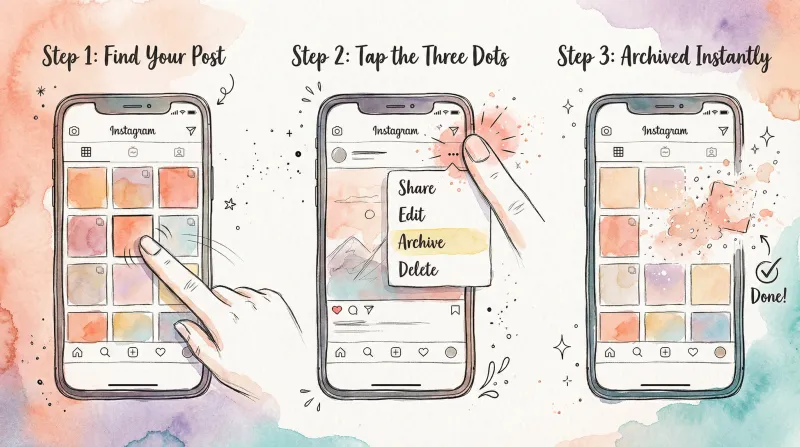
The moment you archive an Instagram post, it vanishes from your profile grid instantly. Followers browsing your page won’t see it anymore, and it won’t appear in hashtag searches or location tags.
If someone had the post open before you archived it, they’ll see an error message when trying to refresh or interact with it. The content becomes completely inaccessible to everyone except you within seconds.
Engagement Data Preservation
Every single piece of engagement data remains perfectly intact when you archive Instagram posts. All likes, comments, shares, saves, and view counts stay preserved exactly as they were.
This is crucial for businesses and influencers who track performance metrics. You can still access Instagram Insights for archived posts, review engagement patterns, and analyze what worked even years after archiving.
Timeline Position Retention
Archived posts remember their original publication date and grid position. When you unarchive a post, it returns to the exact spot it occupied before archiving—not to the top of your feed as new content.
This means unarchiving won’t trigger notifications to followers or appear in their feeds as fresh content. The post simply reappears where it always belonged chronologically.
What Happens When You Archive Instagram Stories?
Auto-Archive Functionality
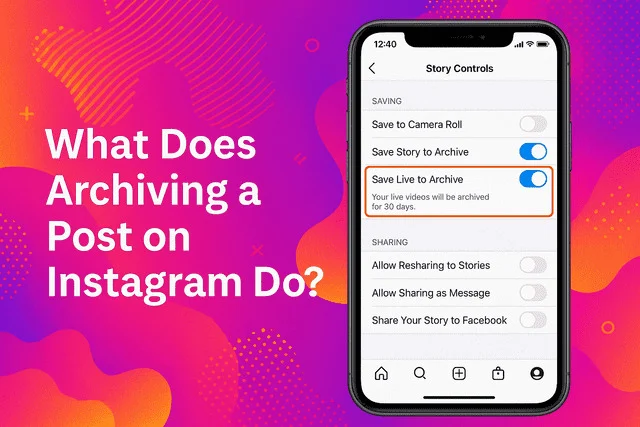
Instagram Stories automatically archive after their 24-hour expiration if you’ve enabled the “Save to Archive” setting in your privacy preferences. This happens without any manual action required from you.
Manually archived stories—those you archive before the 24-hour window expires—also move to your Stories Archive immediately. Both automatic and manual archives function identically.
Story Archive Organization
Archived stories organize chronologically in a separate section from archived posts. You can browse them by date, search through old stories, and even add them to Highlights directly from your archive.
The Stories Archive essentially becomes your personal Instagram memory vault, storing every story you’ve ever posted (if auto-archive is enabled) for as long as your account exists.
Highlights and Archived Stories
Stories in your archive can be added to Instagram Highlights anytime, even years after their original posting. This allows you to curate permanent collections from temporary content.
Removing a story from Highlights doesn’t delete it from your archive. The story returns to your archive folder, maintaining its place in your private collection.
What Happens When You Archive a Facebook Post?
Facebook’s Hidden Posts System
Facebook doesn’t use the term “archive” for individual posts. Instead, the platform allows you to “hide” posts, which removes them from your timeline while keeping them in your Activity Log.
Hidden Facebook posts remain accessible through your Activity Log, where you can manage visibility, delete permanently, or restore posts to your timeline whenever you choose.
Activity Log Management
Your Activity Log serves as Facebook’s version of an archive. It contains every post, photo, comment, and interaction you’ve made on the platform, organized chronologically.
From Activity Log, you can filter by content type, date range, or visibility status. This makes finding and managing hidden posts straightforward, though less intuitive than Instagram’s dedicated Archive folder.
Privacy Implications on Facebook
When you hide a Facebook post, it becomes visible only to you. Tagged friends can no longer see it, it won’t appear in search results, and it’s removed from Facebook’s algorithm distribution.
However, Facebook retains the data on its servers. The post isn’t truly “gone” from Facebook’s systems—just from public view on your profile.
What Happens When You Archive Content on Twitter/X?
Twitter’s Lack of Native Archive Feature
Twitter doesn’t offer a built-in archive function for individual tweets. Once posted, your options are keeping it visible or deleting it permanently—no middle ground exists.
This limitation frustrates users who want temporary hiding capability. Many turn to third-party tools or simply delete and recreate accounts to manage old content.
Downloading Your Twitter Archive
Twitter allows you to download your entire account archive, which creates a local copy of all your tweets, direct messages, and media. This serves as a backup but doesn’t hide content from your public profile.
To download your Twitter archive, navigate to Settings → Your Account → Download an archive of your data. Twitter emails you a download link within 24 hours containing all your account data.
Alternative Twitter Management Strategies
Without native archiving, Twitter users employ workarounds. Some delete old tweets using third-party apps like TweetDelete or Semiphemeral, which automatically remove tweets older than specified time periods.
Others create private lists to track important tweets or use Twitter’s “protected tweets” feature to make their entire account private, though this affects all content rather than individual posts.
What Happens When You Archive LinkedIn Posts?
LinkedIn’s Current Archive Limitations
LinkedIn doesn’t currently offer post archiving functionality. You can edit posts after publishing, but there’s no option to temporarily hide them from your profile.
Your only options are leaving the post visible or deleting it permanently. This makes LinkedIn less flexible than Instagram or Facebook for content management and profile curation.
LinkedIn Content Management Alternatives
To manage your LinkedIn presence without archiving, consider these approaches: delete underperforming posts entirely, edit posts to update information rather than removing them, or create new posts that supersede old content.
Some users maintain spreadsheets tracking their LinkedIn posts, noting performance metrics before deletion. This preserves data insights even when the original post is removed.
Downloading LinkedIn Data
LinkedIn allows you to download your complete profile data, including all posts, articles, connections, and messages. Navigate to Settings → Data Privacy → Get a copy of your data.
This creates a permanent backup of your LinkedIn activity, though it doesn’t hide content from your public profile like true archiving would.
The Technical Process: What Happens Behind the Scenes When You Archive
Server-Side Storage Mechanisms
When you archive a post, social media platforms move it to a different database table or add a “visibility: private” flag. The content doesn’t physically move or get compressed—it simply changes classification.
Platforms like Instagram maintain separate data structures for active content versus archived content, allowing quick retrieval when you decide to unarchive while keeping it hidden from public queries.
Database Query Modifications
Your archived posts are excluded from database queries that populate public feeds, profiles, and search results. The platform’s systems recognize the archive status and automatically filter these posts out.
When you access your archive folder, the system runs specialized queries to retrieve only your archived content, organizing it chronologically for easy browsing.
Algorithm Implications
Archived posts exit Instagram’s recommendation algorithm entirely. They won’t appear in Explore feeds, suggested content, or hashtag searches. The algorithm treats them as if they don’t exist for distribution purposes.
However, archiving doesn’t negatively impact your account’s overall algorithm standing. Your visible, active posts continue performing normally without penalty for having archived content.
Engagement Metrics: What Happens to Likes, Comments, and Shares?
Preserved Engagement Data
All engagement metrics freeze in their current state when you archive a post. The like count, number of comments, shares, saves, and view counts remain exactly as they were at the moment of archiving.
This preservation is permanent. Whether you unarchive in a week or five years, the engagement data returns intact. Nothing is lost or degraded during the archiving period.
No New Engagement Possible
Archived posts cannot receive new engagement. Since they’re invisible to everyone except you, nobody can like, comment, share, or interact with the content in any way.
If someone had a direct link to the post before archiving, clicking it will show an error message. The post essentially becomes dead to interaction while archived.
Engagement Recovery Upon Unarchiving
When you restore an archived post to your profile, all original engagement becomes publicly visible again. The likes, comments, and shares reappear exactly as they were.
However, unarchiving doesn’t generate new engagement. The post returns to its original timeline position rather than appearing as fresh content, so it won’t get the algorithmic boost new posts receive.
Privacy and Security: Who Can See Your Archived Posts?
Complete Privacy Guarantee
Archived posts are absolutely, completely private. Only you can see them—not followers, not blocked users, not even people tagged in the original post.
Instagram, Facebook, and other platforms guarantee this privacy level. Archived content is more private than posts set to “Close Friends” or limited audiences because only the account owner has access.
Tagged Users and Archived Content
When you archive a post where others were tagged, those tagged users lose access immediately. The post disappears from their tagged photos section and their profile.
They receive no notification that the post was archived. From their perspective, it simply vanishes. If they try to find it, they’ll discover it’s no longer accessible.
Access from Other Devices
You can access your archived posts from any device where you’re logged into your account. The archive syncs across all platforms—mobile app, desktop browser, tablet interface.
This cross-device accessibility makes archive management convenient. You can archive on mobile and review archived content on desktop seamlessly.
Restoration Process: What Happens When You Unarchive a Post?
Unarchiving Mechanics
Unarchiving reverses the archive action completely. The post moves from your private archive back to your public profile, becoming visible to all followers and appearing in hashtag/location feeds again.
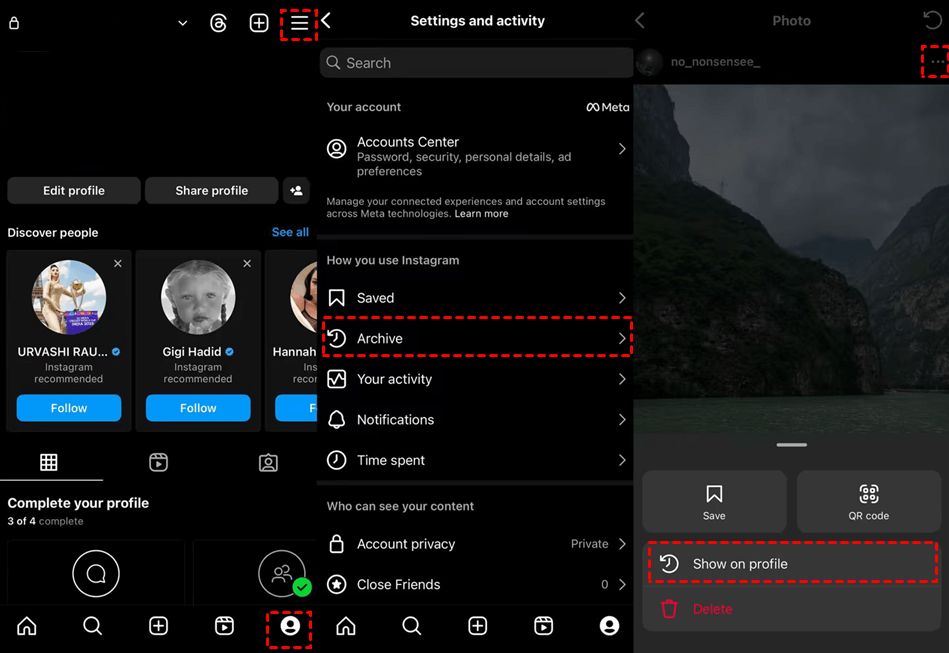
On Instagram, the process is instantaneous. Tap the post in your archive, select the three-dot menu, choose “Show on Profile,” and within seconds it reappears on your grid.
Timeline Position After Restoration
Unarchived posts return to their original chronological position based on publication date, not the unarchive date. If you archived a post from January 2023 and unarchive it in February 2026, it appears in your grid where January 2023 posts belong.
This timeline integrity prevents profile confusion. Your grid maintains its chronological order regardless of archiving and unarchiving actions.
Follower Notifications and Feed Appearance
Unarchiving does NOT notify followers or make the post appear in their feeds as new content. The post quietly returns to your profile without algorithmic distribution or notification triggers.
Followers would only notice unarchived posts if they actively browse your profile and remember what was previously there. Most users won’t notice at all.
Strategic Uses of Archive Across Different Account Types
Personal Accounts and Life Transitions
Personal users frequently archive posts during major life changes—breakups, job transitions, personal growth phases. The archive allows you to hide content that no longer represents who you are without losing memories.
Many people archive college party photos when entering professional careers, old relationship pictures after breakups, or cringey posts from younger years while keeping them for nostalgic purposes.
Influencer Content Curation
Influencers use archiving to maintain aspirational profile aesthetics. They archive off-brand posts, low-performing content, or seasonal posts that don’t fit current themes.
This creates the illusion of consistent quality. Followers see only the influencer’s best work, while everything else remains accessible in the archive for potential future use or sponsor portfolio reviews.
Business Brand Management
Businesses strategically archive promotional posts after campaigns end, outdated product announcements, time-sensitive offers, and content that no longer aligns with current brand messaging.
This keeps business profiles current and relevant. Customers see only active products and services rather than confusing expired promotions.
Common Scenarios: When and Why People Archive Posts
Aesthetic Profile Curation
The most common archiving reason is maintaining visual consistency. Users want cohesive color schemes, themes, or content types on their profiles.
Posts that disrupt the aesthetic get archived. Fashion bloggers archive winter content during summer, minimalist accounts hide cluttered images, and travel influencers archive local content when pivoting to destination posts.
Performance-Based Archiving
Some users archive low-performing posts to improve their profile’s perceived engagement rate. If most posts get 1,000 likes but one only got 100, archiving the underperformer makes the profile appear more consistently successful.
This practice is controversial but common among growth-focused accounts. The archive hides “failures” while showcasing only top-performing content.
Rebranding and Identity Shifts
Personal rebranding—career changes, lifestyle pivots, new creative directions—often triggers mass archiving. Someone transitioning from fitness content to business coaching might archive all workout posts.
The archive preserves the old identity while presenting the new one publicly. If the rebrand fails, everything can be restored.
Archive vs. Delete: Critical Differences Explained
Comparison Table
| Feature | Archive | Delete |
|---|---|---|
| Visibility | Hidden from everyone except you | Permanently removed from platform |
| Reversibility | Can be restored anytime | Irreversible—gone forever |
| Engagement Data | Fully preserved with post | Destroyed completely |
| Timeline Position | Maintains original date position | N/A (cannot be restored) |
| Platform Storage | Stored indefinitely on servers | Removed from servers (typically) |
| Privacy Level | Private to account owner only | Complete erasure |
| Best For | Temporary hiding, aesthetic changes, testing | Removing unwanted/inappropriate content |
| Algorithm Impact | No negative effect | No direct penalty but history lost |
When to Choose Archive Over Delete
Archive when you might want the content back later, need to preserve engagement metrics for business analysis, want to maintain profile aesthetics without losing memories, or are testing different profile configurations.
Archive is ideal for temporary changes, seasonal content rotation, brand experiments, and protecting content you’re unsure about rather than making irreversible deletion decisions.
When Deletion Is More Appropriate
Delete when content violates platform guidelines, contains genuinely regrettable material, includes privacy violations or sensitive information, or represents content you’ll never want restored under any circumstances.
Deletion is final and appropriate for truly unwanted content. If there’s any chance you’ll want it back, archive instead.
Platform-Specific Archive Features and Limitations
Instagram Archive Capabilities
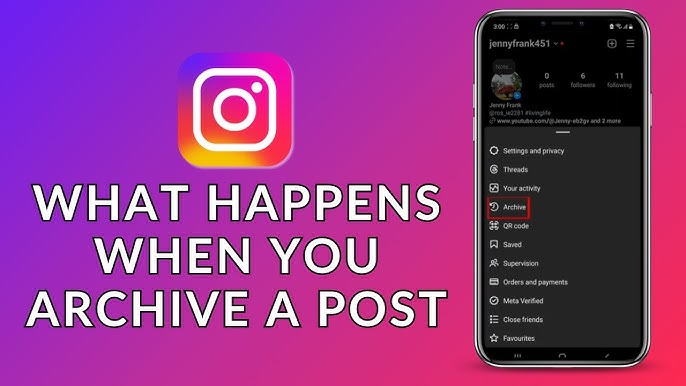
Instagram offers the most comprehensive archive system. You can archive individual posts, entire story days, live videos, and IGTV content separately.
The platform provides dedicated archive folders for each content type, auto-archive options for stories, bulk selection tools for mass archiving, and unlimited storage duration for all archived content.
Facebook Hidden Posts Features
Facebook’s “hide” functionality works through Activity Log rather than a dedicated archive section. You can hide posts, photos, videos, and life events from your timeline.
Hidden content remains visible in your Activity Log with filtering options by type and date. Facebook also allows you to limit past posts’ visibility to friends instead of public in one bulk action.
TikTok Private Videos
TikTok offers a “private” video option rather than true archiving. Setting a video to private hides it from public view but keeps it on your profile accessible only to you.
This functions similarly to archiving—the video stays in your content list but invisible to others. You can toggle between public and private status anytime.
Advanced Archive Strategies for Maximum Benefit
Seasonal Content Rotation
Businesses and themed accounts use archiving for seasonal content rotation. Holiday-themed posts get archived after the season ends, then unarchived when that holiday approaches again next year.
This strategy keeps profiles timely and relevant year-round while eliminating the need to recreate content annually. It’s efficient and maintains engagement history across years.
A/B Testing Profile Layouts
Advanced users archive posts to test different profile grid arrangements. Archive certain posts to see if changing your visual layout affects follower growth or engagement rates.
This data-driven approach helps optimize profile aesthetics based on actual performance metrics rather than guesswork about what followers prefer.
Engagement Rate Optimization
Growth-focused accounts archive their lowest-performing posts to improve visible engagement rate percentages. When potential sponsors or followers view your profile, they see only high-performing content.
While somewhat controversial, this practice is common among influencers seeking brand partnerships where engagement rate directly impacts earning potential.
How Archive Affects Different Types of Content
Photo Posts and Archiving
Standard photo posts archive most commonly. They occupy permanent grid real estate and significantly impact profile aesthetics, making them prime candidates for strategic archiving.
Archived photos retain all filters, edits, captions, and hashtags. When unarchived, everything returns exactly as originally posted without requiring re-editing or caption rewriting.
Video Posts and Archive Storage
Video posts archive identically to photos. The full video file, length, cover image, captions, and engagement metrics all preserve completely during archiving.
Archive storage doesn’t compress or reduce video quality. Unarchived videos play at their original resolution and file quality.
Carousel Posts Management
Carousel posts (multiple images/videos in one post) archive as complete units. You can’t archive individual slides—the entire carousel goes to archive together.
When unarchived, the carousel returns with all slides in their original order, maintaining the complete multi-image/video experience.
Third-Party Tools and Archive Management
Social Media Management Platforms
Tools like Later, Hootsuite, Buffer, and Planoly integrate with platform APIs to help manage archived content alongside active posts. These tools often provide better visualization of archived versus live content.
Some platforms offer archive scheduling—automatically archiving posts after specified time periods or when certain conditions are met, streamlining content lifecycle management.
Archive Download and Backup Tools
Several third-party services specialize in downloading complete social media archives for local storage. ArchiveSocial, PageFreezer, and Smarsh cater primarily to businesses needing regulatory compliance.
These tools capture everything—public posts, private messages, comments, media files—creating comprehensive backups independent of platform-controlled archives.
Content Calendar Integration
Modern content calendars like Notion, Airtable, and Asana can track which posts are archived versus live. This helps teams coordinate content strategies across archived and active content.
Integration allows marketing teams to note why specific posts were archived, when they might be unarchived, and how they fit into long-term content strategies. Integration allows the Brew Interactive digital marketing team to note why specific posts were archived, when they might be unarchived, and how they fit into long-term content strategies.
Archive Best Practices for 2026
Regular Archive Audits
Set quarterly reminders to review your archived content. Decide whether archived posts should remain hidden, be unarchived, or be deleted permanently.
This prevents archive folders from becoming digital junk drawers filled with content you’ll never revisit. Regular audits maintain intentional content management.
Documentation of Archive Reasons
For business accounts, document why each post was archived. Create a simple spreadsheet noting the post, archive date, reason, and potential unarchive date.
This documentation helps teams understand content decisions, especially when multiple people manage the account. It prevents confusion and supports strategic planning.
Balance Between Curation and Authenticity
While archiving enables perfect curation, overusing it can make profiles feel inauthentic. Followers appreciate seeing growth, evolution, and occasional imperfection.
Find balance between maintaining aesthetic standards and showing genuine human experience. Not every post needs to be perfect—archive selectively rather than obsessively.
Troubleshooting Common Archive Issues
Can’t Find Archive Option
If you don’t see the archive option, ensure your app is updated to the latest version. Outdated apps may lack newer features like archiving.
Also verify you’re trying to archive your own content—you can only archive posts from your account, not others’ posts even if you’re tagged.
Archived Posts Not Appearing
If archived posts seem missing, check that you’re viewing the correct archive type (Posts vs. Stories vs. Live). Instagram separates these categories in the archive dropdown.
Poor internet connection can also prevent archived content from loading. Switch networks or restart your app if the archive appears empty despite having archived content.
Unable to Unarchive Content
Unarchiving failures typically result from connectivity issues or app bugs. Force close the app, ensure strong internet connection, and try again.
If problems persist, uninstall and reinstall the app. Your archived content is stored on Instagram’s servers and won’t be lost during reinstallation.
The Psychology Behind Social Media Archiving
Digital Identity Management
Archiving reflects our desire to control how we’re perceived online. It allows continuous identity curation while maintaining personal history privately.
This psychological need for controlled self-presentation drives archiving adoption. We want to show our best selves publicly while privately preserving our complete selves.
The Fear of Permanent Deletion
Many people experience deletion anxiety—worry about regret after permanently removing content. Archiving solves this by offering reversible hiding.
This psychological safety net encourages more aggressive content management. Knowing you can always restore archived posts makes hiding them less stressful.
Nostalgia and Memory Preservation
Archived stories and posts serve as personal time capsules. People archive content they want hidden publicly but preserved personally for future nostalgia.
This dual purpose—public hiding plus private preservation—makes archiving psychologically satisfying in ways deletion cannot match.
Future of Archiving on Social Media Platforms
Predicted Archive Features for 2026-2027
Expect AI-powered archive recommendations suggesting posts to archive based on performance, relevance, and brand consistency. Machine learning will analyze your content patterns and flag archiving candidates.
Bulk archiving enhancements will allow date range selections, multi-platform archiving from single dashboards, and automated archiving rules based on custom criteria.
Cross-Platform Archive Integration
Future social media management tools may offer unified archive views across all platforms. Manage Instagram, Facebook, TikTok, and LinkedIn archives from one interface.
This cross-platform visibility will streamline content strategy for users maintaining presences on multiple networks simultaneously.
Enhanced Archive Analytics
Coming features may include performance comparisons between archived and active content, visualization of how archiving affects follower growth, and ROI calculations for archiving strategies.
These analytics will help users make data-driven archiving decisions rather than relying on intuition alone.
Real-World Examples: Archive Success Stories
Influencer Rebranding Case Study
Fashion influencer @StyleEvolution archived all her 2020-2023 fast fashion content when pivoting to sustainable fashion in 2024. She kept the posts archived for portfolio purposes while presenting only sustainable content publicly.
Her engagement rate improved 34% post-archiving as her grid became cohesive and aligned with her new values. Brands seeking sustainable partnerships found her profile more compelling.
Business Campaign Management
Boutique coffee shop @LocalBrewCafe archives seasonal menu posts after each season ends. Their fall pumpkin spice campaign gets archived in November, then unarchived the following September.
This strategy eliminates the need to recreate content yearly while keeping their profile seasonally relevant. They’ve maintained consistent messaging across three years using archived content rotation.
Personal Account Life Transition
User @CareerJourney archived all personal/casual content when transitioning from student to professional job seeker. Photos remained in her archive for memories while her public profile showcased only professional content.
After landing her dream job, she selectively unarchived some personal posts to show more personality, demonstrating how archiving enables flexible identity presentation.
Frequently Asked Questions (FAQs)
What happens when you archive a post on Instagram?
When you archive an Instagram post, it immediately disappears from your public profile and becomes invisible to all followers. The post retains all likes, comments, and engagement data while moving to your private Archive folder accessible only to you.
Can people see if I archive a post on social media?
No, archiving is completely private. Followers receive no notifications, and there’s no indication on your profile that content was archived. The post simply vanishes from view without alerting anyone.
Does archiving a post delete comments and likes?
No, archiving preserves all engagement data perfectly. Every like, comment, share, save, and view count remains intact and accessible to you even while the post is hidden from public view.
How long do archived posts stay in my archive?
Archived posts remain in your archive indefinitely until you either unarchive them or delete them permanently. There’s no expiration date or automatic deletion of archived content.
Can I unarchive a post on Instagram?
Yes, you can unarchive posts anytime. Navigate to your Archive folder, select the post, tap the three-dot menu, and choose “Show on Profile” to restore it to your grid.
What’s the difference between archiving and deleting a post?
Archiving temporarily hides posts while preserving all data and allowing restoration anytime. Deleting permanently removes posts from the platform with no recovery option and destroys all engagement data.
Does Facebook have an archive feature like Instagram?
Facebook uses “hidden posts” through Activity Log rather than a dedicated Archive folder. You can hide posts from your timeline, but the interface differs from Instagram’s archive system.
Can I archive posts on Twitter or LinkedIn?
No, Twitter and LinkedIn don’t offer native archive features. You can only download your complete data archive or delete posts permanently on these platforms.
Will archiving posts hurt my Instagram algorithm?
No, archiving doesn’t negatively impact your algorithm performance. Active posts continue performing normally, and Instagram doesn’t penalize accounts for having archived content.
When should I archive instead of delete a social media post?
Archive when you might want the content back later, need to preserve engagement metrics, want to test different profile aesthetics, or manage seasonal content rotation without permanent loss.
Conclusion
What happens when you archive a post fundamentally transforms how we manage our digital identities across social media platforms in 2026.
Understanding that archiving creates temporary, reversible hiding—preserving all engagement data, maintaining original timeline positions, and offering complete privacy—empowers users to curate their online presence with unprecedented flexibility and control.
The strategic advantages of archiving over deletion are undeniable: you maintain valuable engagement metrics for business analysis, protect memories while evolving your public image, experiment with profile aesthetics without permanent consequences, and manage seasonal or time-sensitive content with efficiency that wasn’t possible in social media’s earlier years.